

Apple silicon MacBooks in good condition generally resell within ranges that vary substantially based on chip generation and storage, while Intel models usually fetch lower amounts. Exact figures depend on model specifics. If you want the most cash, a private sale usually wins; if you want it settled today, a local cash buyer or trade-in beats waiting on a buyer to respond. Start by looking up your exact model, then decide which trade-off matters more to you.
TL;DR:
- Processor generation and condition are the most significant factors influencing resale value, with Apple silicon models generally commanding higher prices than Intel counterparts.
- Resale prices vary widely based on storage, screen size, and model specifics, with trade-in offers often conservative compared to private sale or local cash buyer estimates.
- Battery health and software support status strongly impact offers, as worn batteries or unsupported models lead to lower bids or devaluation to “vintage” status.
- Selling during peak demand seasons like back-to-school or just before new product launches can significantly increase final sale prices.
- Protect yourself from scams by insisting on in-person, cash or verified transfers, avoiding shipping before payment clears, and thoroughly preparing your Mac before sale.
Table of Contents
- How to Check Your MacBook Resale Value by Model
- What Actually Moves the Price on a Used MacBook
- Trade-In, Private Sale, or Local Cash Buyer: Which Route Actually Pays More?
- How to Prepare Your MacBook to Sell for the Best Offer
- Getting Multiple Quotes and Comparing Them Fairly
- When Should You Actually Sell Your MacBook?
- How Fast Does a MacBook Lose Value After Purchase?
- Watch for These Common MacBook Selling Scams
- What to Do With a MacBook That Won’t Sell
- Get a Cash Offer for Your MacBook in Miami Today
- Sources
How to Check Your MacBook Resale Value by Model
Before you accept any offer, find out exactly what you’re holding. Open the Apple menu, click “About This Mac,” and note the model name, year, chip, and storage. That single screen tells you more about your MacBook resale value than any guess based on how the laptop looks or feels.
Cross-reference that model against your serial number (also under “About This Mac,” or under the battery on older Intel units) to confirm the exact configuration, since Apple sold multiple RAM and storage variants under the same model name.
Based on model details, 2026 resale prices for MacBooks in average condition typically vary widely depending on chip generation, storage, and screen size, so exact price bands can differ accordingly without fixed ranges.
These bands assume average condition, not mint. For an instant, model-specific number, run your specs through a buyback calculator or an official trade-in estimate. Trade-in tools tend to quote conservatively because Apple resells or recycles at scale, while independent buyback calculators and local buyers often quote closer to what the open market will actually pay, according to pricing data from LaptopReno. Run two or three of these before you settle on a number in your head.
What Actually Moves the Price on a Used MacBook
Processor generation drives the largest swing in value, full stop. A 2020 M1 MacBook Air routinely outsells a 2019 Intel MacBook Pro despite the Pro’s higher original price, because Apple silicon delivers better battery life and stays supported longer. Buyers know this now, and it shows up in every offer you’ll get.
Beyond the chip, condition does the heavy lifting on where you land within a given price band. According to MakeUseOf’s breakdown of Mac resale factors, condition, demand, original cost, sales channel, timing, and internal upgrades are the seven variables that consistently move a Mac’s price up or down. A few specifics worth knowing:
- Screen damage (cracks, dead pixels, or coating wear) can cut an offer by a third or more, even when everything else works fine.
- Liquid damage, even if the machine still boots, pushes a MacBook into “parts” territory for most buyers.
- RAM and storage upgrades matter most on higher-end configurations. A 16GB/512GB M2 Pro will out-earn an 8GB/256GB base model by a meaningful margin, but bumping a low-value Intel Air from 128GB to 256GB rarely moves the needle much.
Battery health strongly influences resale value; a worn battery or high cycle count often leads to lower offers, reflecting anticipated replacement costs and buyer caution. - Software support status matters too. Once a model falls off Apple’s security-update list, “vintage” or “obsolete” status accelerates the price drop, because business and security-conscious buyers stop bidding on it entirely.
- Original accessories (charger, box, receipt) won’t make or break the sale, but they push you toward the top of your price band rather than the bottom.
Check your cycle count under System Settings > General > About > System Report > Power before you get any offer. It’s the single most overlooked number in a private listing.
Trade-In, Private Sale, or Local Cash Buyer: Which Route Actually Pays More?
Every selling route trades something for something else. Trade-in programs are fast and safe but pay the least, since the company reselling your Mac needs its own margin. Private sales usually pay the most in raw dollars, but that premium shrinks once you count the hours spent photographing, answering messages, and negotiating with strangers. Local cash buyers sit in the middle: quicker than a private sale, usually higher than a trade-in, and settled the same day.
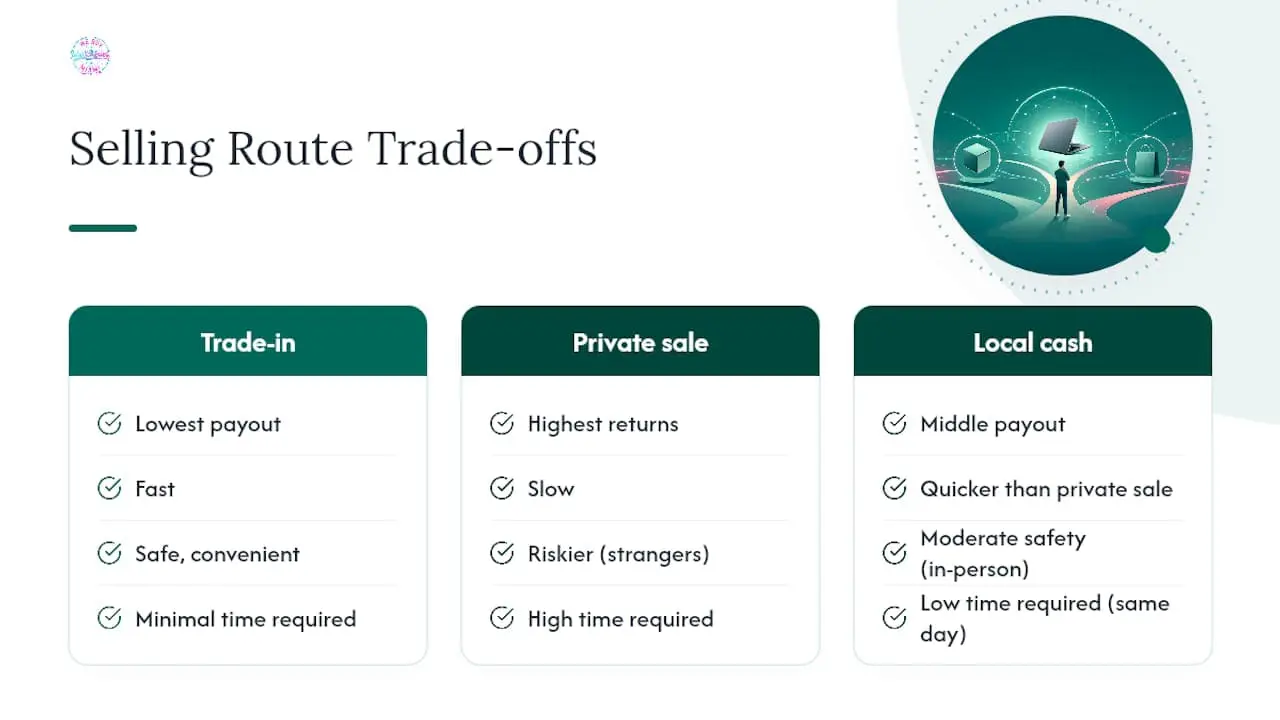
Here’s how the three compare on the factors that actually matter to a seller:
Trade-in programs typically offer the lowest payout but provide safety and convenience, often as store credit. Private sales can yield the highest returns but take more time and involve higher risks. Local cash buyers often offer a middle ground with quicker, in-person cash payments.
To estimate the real payout delta, check completed listings for your exact model rather than active asking prices, then subtract what your time is worth. MacSolutions Plus notes that trade-ins favor convenience and predictability, while private sales reward sellers willing to put in the work. If your MacBook has a cracked screen, a failing battery, or you simply need money before the weekend, a local cash buyer is usually the better fit than gambling on a private buyer showing up for a device with visible flaws.
Pro Tip: Before you list anything privately, price your MacBook against three sold listings within the past two weeks, not active ones. Active listings are wishes; sold listings are facts.
How to Prepare Your MacBook to Sell for the Best Offer
Preparation is where sellers either protect their price or accidentally torch it. Follow these steps in order:
- Back up everything first. Use Time Machine or iCloud to save your files before you touch any settings. There’s no undo button once you erase.
- Sign out of iMessage under Messages > Settings, so your phone number stops routing texts to a laptop you no longer own.
- Turn off Find My Mac in System Settings under your Apple ID profile. Skipping this step leaves Activation Lock active, and a locked Mac is close to worthless to a buyer.
- Erase the machine properly. On Apple silicon and T2-equipped Macs, use Erase All Content and Settings under System Settings > General > Transfer or Reset. Older Intel Macs need Recovery Mode instead, restarting while holding Command+R, per Apple Support’s official erase guidance and this step-by-step reset walkthrough from 9to5Mac.
- Document the condition. Photograph the screen, keyboard, ports, and chassis in good light, and note the battery cycle count from System Report.
- Gather accessories. Original charger, box, and receipt all help, even if they don’t dramatically change the number.
| Prep step | Why it matters |
|---|---|
| Backup | Protects your files before wiping |
| Sign out of iMessage/Apple ID | Prevents lost texts and account conflicts |
| Disable Find My Mac | Removes Activation Lock so the buyer can use it |
| Erase All Content and Settings | Leaves the Mac clean and ready for a new owner |
| Photograph condition and cycle count | Builds buyer trust and speeds up negotiation |
A short checklist like this, shown to a buyer or included in a listing, shortens negotiation time and tends to land you closer to the top of your price range.
Getting Multiple Quotes and Comparing Them Fairly
Check three sources before you commit to any single offer: an official trade-in quote, a buyback calculator, and one private-sale comp from a completed listing. Each one gives you a different piece of the real picture, and together they tell you whether an offer is fair or lowball.
To get an accurate number from any of them, have this ready:
- Exact model and serial number
- Battery cycle count
- Storage and RAM configuration
- Clear photos of the screen, keyboard, and body
- Original accessories, if you still have them
Store credit isn’t cash, so convert it honestly. If a trade-in offers $600 in credit toward a new Mac you weren’t planning to buy anyway, that’s not really $600 in value. Subtract any shipping costs or listing fees from buyback and marketplace offers to see the real net number, a step LaptopReno’s pricing guide recommends before accepting anything.
Watch for red flags in private sales: no fixed meeting location, requests for payment through gift cards or wire transfers, or buyers who want to “test it first” and disappear with your device.
When Should You Actually Sell Your MacBook?
Timing changes your payout more than most sellers realize. Selling right after Apple announces a new model usually tanks resale prices for a few weeks, since buyers wait to see if last year’s model drops further. Market saturation around launch windows depresses used prices across the board, and sellers who wait a month or two, or sell just before the announcement instead, tend to protect more of their value.
Back-to-school season, roughly July through September, tends to boost demand for mid-range MacBook Air models as students shop on a budget. If you’re holding an M1 or M2 Air, that window is often your best shot at a stronger offer.
Small presentation choices help too. A quick wipe-down, a fresh set of photos in natural light, and an honest note about battery health build trust faster than a generic listing. When you do price it, list slightly above your target number and adjust down based on sold comps, not asking prices, so you land where the market actually is rather than where you hoped it would be.
Pro Tip: List your MacBook on a Sunday evening. Marketplace traffic tends to spike at the start of the week, and early visibility often means a faster, cleaner sale.
How Fast Does a MacBook Lose Value After Purchase?
Depreciation hits hardest in year one, then slows into a steadier decline.
By year two or three, depreciation flattens to roughly 10% to 15% per year, since the machine still runs current macOS versions and holds daily-use appeal. This is usually the sweet spot for sellers: recent enough to command real money, old enough that you’ve gotten real use out of it.
The steepest drop-off arrives when a model loses macOS security updates, typically five to seven years after release. Once a MacBook hits “vintage” status, values can fall sharply in a matter of months as buyers shift toward supported machines. An M1 MacBook Air from 2020, for instance, still holds meaningful resale value in 2026 because it remains on Apple’s active support list, while a 2015 Intel MacBook Air of similar original price now sells for a fraction of what it once cost.
The practical takeaway: if your MacBook is within its first three years, you’re likely sitting near the top of its depreciation curve. Waiting rarely helps after that point, since the decline accelerates rather than levels off.
Watch for These Common MacBook Selling Scams
Private sales carry the highest payout potential and the highest risk, and most of that risk comes down to a handful of repeat scams.
Overpayment and refund requests top the list. A buyer sends a check or payment for more than your asking price, then asks you to refund the difference, usually before the original payment clears or bounces entirely.
Shipping-first requests are another common trap. A buyer insists on paying only after you ship the MacBook, leaving you with no laptop, no payment, and no recourse.
Fake payment confirmations show up often on marketplace apps, where a buyer sends a screenshot of a “completed” transfer that never actually posts to your account.
Meetup risk applies to any in-person private sale, especially when a buyer wants to meet somewhere isolated or insists on testing the device somewhere out of your sight.
Protect yourself by insisting on cash or a verified instant transfer completed before the device leaves your hands, meeting in a public, well-lit location, and never shipping before payment fully clears. If a deal feels rushed or a buyer avoids meeting in person, walk away. A local cash buyer sidesteps nearly all of this risk, since the inspection, offer, and payment happen face-to-face in one visit.
What to Do With a MacBook That Won’t Sell
Not every MacBook has resale value left in it. Water damage, a cracked logic board, or a model old enough to fall off Apple’s support list can mean the honest answer is recycling rather than selling.
Responsible recycling matters here, since laptops contain lithium batteries and trace metals that shouldn’t end up in a landfill. Apple Support’s guidance on preparing a Mac before you recycle it outlines the same data-wiping steps you’d use before a sale, since a device headed for recycling still needs Find My Mac disabled and your data erased first.
Even a MacBook with no resale value often has recoverable parts, working RAM chips, functional displays, or intact logic boards, that a refurbisher can pull for repair parts rather than sending the whole unit to a shredder. That keeps usable materials in circulation longer and reduces the environmental footprint of extracting new raw materials for replacement parts. If you’re unsure whether your MacBook is worth selling or recycling, getting it inspected in person is the fastest way to find out for certain rather than guessing from a checklist.
Get a Cash Offer for Your MacBook in Miami Today
For MacBooks with remaining value, face-to-face transactions offer a quick way to convert them to cash through immediate inspection and payment, avoiding shipment and seller-buyer delays.

This route suits sellers who want a same-day answer more than the last possible dollar, especially if your MacBook has a cracked screen, battery issues, or falls outside Apple’s trade-in eligibility. Before your appointment, back up your files, disable Find My Mac, and run Erase All Content and Settings so your Mac is ready to hand over the moment you agree on a price. Bring your charger, your original receipt if you still have it, and a valid ID.
At the appointment, we’ll check the model, condition, battery health, and accessories, then hand you a cash offer you can accept or decline with no obligation. Ready to see what your machine is worth in person? Visit the Sell Your MacBook in Miami page to check hours and get directions, or browse everything we buy if you’re clearing out more than one device.
Sources
- How Much Is My Used MacBook Worth? (2026 Prices) | LaptopReno
- 7 Factors That Affect Your Mac’s Resale Value | MakeUseOf
- What to do before you sell, give away, trade in, or recycle your Mac – Apple Support
- How to reset MacBook and Mac desktops | 9to5Mac
