

Keep every payment inside a trusted channel, like PayPal’s Goods & Services checkout, a marketplace’s built-in payment system, or verified cash in person, and refuse any overpayment, check, or off-platform request before funds actually clear. That single rule stops most scams before they start. The FTC’s guidance on selling online backs this up, and if a deal ever goes sideways, Reportfraud is where you report it. There are straightforward in-person alternatives for sellers who’d rather skip shipping and online payment risk entirely.
TL;DR:
- Always verify payment reflects full settlement by checking your bank or payment app directly before shipping, especially for high-value items over 200 dollars.
- Keep all transactions within the marketplace, using built-in checkout or PayPal Goods & Services, to retain buyer and seller protections and avoid scams.
- Meet local buyers in public, well-lit areas, and carry counterfeit detection tools or meet at a bank for larger cash transactions to reduce physical safety risks.
- Be wary of off-platform payment methods like Zelle, Venmo “friends,” wire transfers, or gift cards, as they lack seller protection and are common scam targets.
- Report any suspected scams immediately through official channels to increase chances of recovery and to help prevent further fraud.
Table of Contents
- Quick Safety Checklist to Avoid Scams Selling Electronics
- How to Sell Online Safely: Payments, Protections, and Shipping
- Selling Locally in Person: Safe Meetings, Cash, and Demos
- Verifying Payments and Avoiding Fake-Check Scams
- Protecting Your Data Before You Hand Over Any Device
- If You Were Scammed: How to Report It and What to Do Next
- Sell Safely In Person With a Local Electronics Buyer
- Authoritative Resources for Reporting and Avoiding Scams
- Sources
Quick Safety Checklist to Avoid Scams Selling Electronics
Before you reply to a single buyer message, run through this list. We built it from the patterns that show up again and again in scam reports, and it takes less time to read than it does to unbox a new phone.
Do this every time:
- Use your marketplace’s built-in checkout or PayPal Goods & Services, never Friends & Family.
- Meet local buyers in a public, well-lit place during daylight hours.
- Require a signature on delivery for higher-value shipments.
- Read every message for pressure tactics (“I need this today”) or a suspiciously high offer.
- Confirm the buyer’s account is established, not created hours ago.
Never do this, ever:
- Accept a payment that’s higher than your asking price, even if the buyer claims it’s a mistake you can “just refund.”
- Ship a device before your bank confirms the payment has fully settled, not just “cleared” on a screen.
- Move the conversation to text messages or WhatsApp because a buyer says it’s “easier.”
- Accept Zelle, Venmo, wire transfers, or gift cards from someone you don’t know.
Pro Tip: If a payment confirmation looks off, don’t ship to find out. Log into your bank or payment app directly, not through a link the buyer sent, and check your actual balance. A screenshot a buyer sends you can be faked in five minutes with basic photo editing.
How to Sell Online Safely: Payments, Protections, and Shipping
Selling electronics online safely comes down to controlling three things: where the conversation happens, how the money moves, and when the package leaves your hands.
Keep every message and every dollar inside the marketplace you’re using. Buyer and seller protection programs, the kind PayPal and most major marketplaces offer, only apply to transactions that happen on their platform. The moment a buyer convinces you to text them instead or send payment through a separate app, you lose that safety net entirely. Marketplace research consistently flags this off-platform payment trap as the most common scam pattern sellers encounter, and it works because it feels harmless in the moment.
Payment methods like Zelle, Venmo (sent as a “friend” rather than for goods), wire transfers, and gift cards share one trait: they’re built for sending money to people you trust, not for paying strangers for merchandise. None of them offer seller protection, and scammers often fake a “payment sent” confirmation screen or email that looks identical to the real thing.
Here’s how to verify a payment before you ship:
- Check your actual account, not a screenshot. Log into your bank or payment app directly and confirm the funds show as available, not pending.
- Wait for final settlement, not just a “cleared” notification. The FTC notes that funds can appear cleared while remaining reversible for days or weeks, particularly with checks and some digital transfers.
- For high-value items, wait 24 to 48 hours after a payment posts before shipping, giving fraudulent transactions time to bounce back.
- Ship with tracking and require a signature on anything over $200, and hold the item until you have delivery confirmation in hand.
If a buyer asks to pick up a shipped item locally instead of having it mailed, treat that request like any other in-person sale: meet in public and verify payment before handing anything over.
Selling Locally in Person: Safe Meetings, Cash, and Demos
In-person sales cut out shipping fraud entirely, but they introduce a different risk: your physical safety and the chance of counterfeit cash. A few habits fix both.
Meet in daylight, in a public location with people around. Many local police departments allow their parking lot to be used for exactly this kind of exchange, and it’s one of the safer, more neutral spots you can pick. Bring a friend if you can, and always tell someone else where you’re headed and roughly how long you expect to be there.
Cash handling deserves its own attention. Large bills get counterfeited more than small ones, so:
- Ask for smaller denominations when the total allows it.
- Carry a counterfeit-detection pen, they’re cheap and take seconds to use.
- For anything over a few hundred dollars, suggest meeting at your buyer’s bank branch, where a teller can verify the bills on the spot.
- Count the cash before the device changes hands, not after.
Refuse pickups from a “friend” or “driver” sent on the buyer’s behalf. If the person paying isn’t the person standing in front of you, the transaction gets harder to trace if something goes wrong later. When a buyer wants to test the device, let them power it on and run it through its paces, but keep your accounts logged in and your personal data intact until payment is fully in hand. There’s no reason to hand over a device that’s still logged into your email or photos just so someone can “check that it works.”
Verifying Payments and Avoiding Fake-Check Scams
The overpayment scam is one of the oldest tricks in the book, and it still works because it plays on politeness. A buyer sends a check for more than your asking price, then asks you to refund the difference, sometimes through a separate payment app. You refund the money, the original check bounces days later, and your bank pulls the full amount back out of your account. The FTC has warned about this exact pattern for two decades, and it hasn’t gone away because it still works.
The core problem is timing: a check can show as “cleared” in your account long before it’s actually confirmed as legitimate by the issuing bank. Government guidance on check and auction fraud recommends calling the issuing bank directly, using the number listed on the bank’s official website rather than anything printed on the check itself, to confirm the check is real before you release any item or refund.
For any high-value sale, wait for irrevocable settlement, meaning the funds are fully final and can’t bounce back, before handing over the device. That usually takes longer than your banking app’s “available balance” suggests.
If a buyer overpays and asks for a refund, here’s language that shuts it down without burning the deal:
- “I can’t process a refund on a payment that hasn’t fully cleared. I’ll need to cancel this sale and relist the item.”
- “I only accept the exact listed price through [platform] checkout. I can’t accept a check for more than that amount.”
- “If this was an error, please cancel the payment on your end. I won’t be sending any funds back.”
Any buyer who pushes back hard on these terms was never a real buyer.
Protecting Your Data Before You Hand Over Any Device
A scam doesn’t have to involve fake money to hurt you. Handing over a device with your accounts still attached hands a stranger access to your email, photos, banking apps, and saved passwords. Wipe every device properly before it leaves your hands.
- Back up everything you want to keep to a cloud service or an external drive.
- Sign out of every account individually, including iCloud, Google, email, and any banking or shopping apps.
- Deauthorize the device from linked services, such as iTunes or Audible licenses, and remove it from your account’s list of trusted devices.
- Remove the SIM card and any SD card.
- Run a full factory reset through the device’s settings menu.
- Confirm activation locks are off, meaning Find My iPhone/iCloud on Apple devices or Factory Reset Protection on Android, before the buyer takes possession.
A factory reset by itself can leave gaps. Deauthorizing cloud services and unlinking the device from your account portals matters just as much, since a reset alone doesn’t always break that connection cleanly.
Pro Tip: Take a screenshot showing the device removed from your account dashboard, plus a photo of the serial number or IMEI, before the sale. If a dispute ever comes up, that’s your proof the device left your possession clean.
Write down the serial number or IMEI, the sale date, and the buyer’s payment method for your own records. Handing the buyer a simple receipt with that same information protects you both if a warranty question or dispute comes up later.
If You Were Scammed: How to Report It and What to Do Next
Act fast. The sooner you move, the better your odds of recovering money or at least stopping further damage.
- Save everything immediately: screenshots of messages, payment confirmations, shipping labels, and tracking numbers.
- Open a dispute with the platform you sold through, or with PayPal directly, the same day you notice a problem.
- Contact your bank or payment app to flag the transaction and ask about reversing it or freezing further activity.
- File a report at ReportFraud.ftc.gov, which routes your complaint into the FTC’s fraud database and helps investigators spot patterns.
- File a police report if you met in person or shipped a physical item, describing the transaction, payment method, and any identifying details about the buyer.
If the payment happened off-platform, through Zelle, a wire transfer, or a gift card, recovery odds drop sharply, since those methods weren’t designed to be reversible. Report it anyway. Even when you can’t get your money back, your report helps flag the buyer’s information for the next seller who runs into them.
Sell Safely In Person With a Local Electronics Buyer
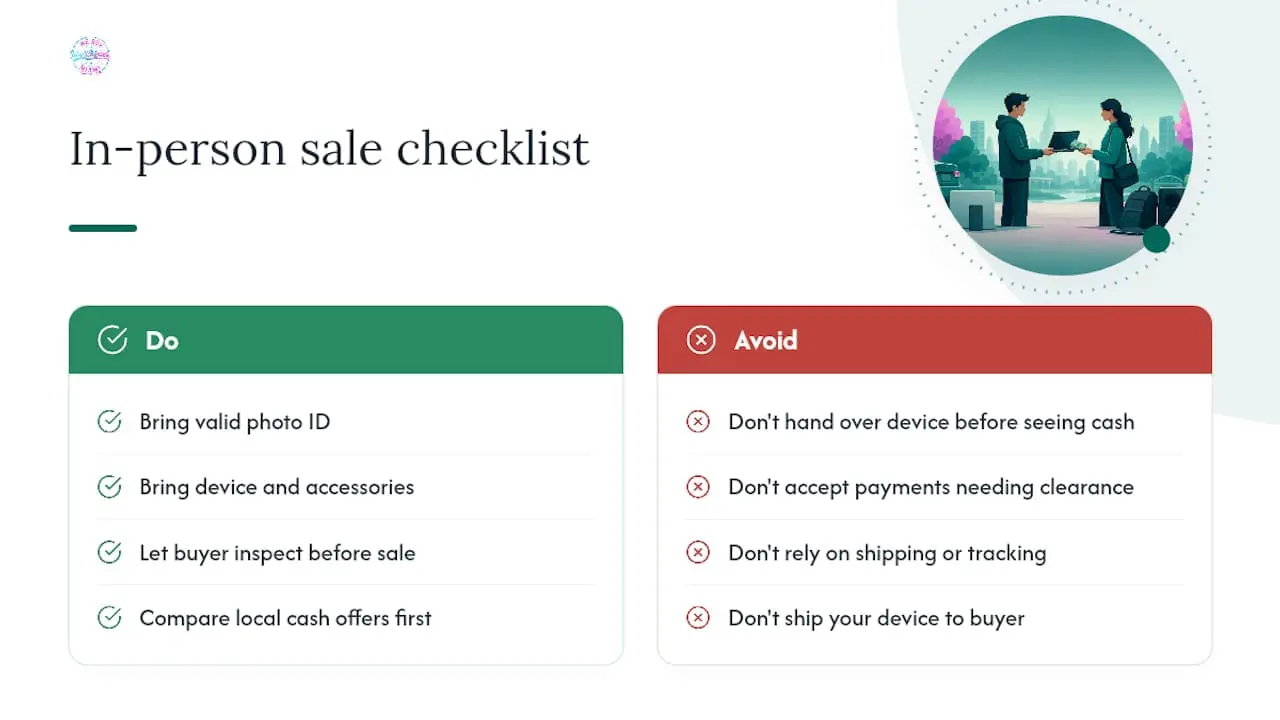
Every step above exists to protect you from a payment that bounces, a buyer who vanishes, or a shipment that goes missing. Some local buyers remove all three risks at once by paying cash, on the spot, for your device after a quick in-person inspection.
We buy phones, laptops, tablets, gaming consoles, cameras, smartwatches, and audio gear, working or damaged, no shipping box or tracking number required. Bring a valid photo ID and the device itself, along with any original accessories or chargers if you still have them, as accessories can affect the offer amount. The device is inspected and an offer is made on the spot; if accepted, payment is given during the visit.
Because the entire transaction happens face to face, you see the cash amount before the device changes hands, avoiding waiting for payment clearance or concerns about bounced checks. For sellers who want to compare this option against other local routes, our guide to where to sell electronics for cash in Miami breaks down what to expect. If you’ve got more than one item to unload, see our tips for selling multiple electronics at once to save yourself repeat trips.
Ready to skip the shipping labels and payment verification altogether? Visit We Buy Electronics Miami to check what your device is worth today.
Authoritative Resources for Reporting and Avoiding Scams
- FTC Consumer Advice: Selling Stuff Online: the government’s core guidance on common online selling scams and how to avoid them.
- Reportfraud: the official portal for filing a fraud report after a scam.
- BBB Tips for Selling Used Items Online: practical advice on meeting locations and shipment tracking from the Better Business Bureau.
Sources
- Selling stuff online? Here’s how to avoid a scam | FTC Consumer Advice
- Internet auction fraud and related consumer protections (government publication)
- How to avoid scams when buying used electronics | Swappa blog
- Reportfraud
